1.先參數.如何搜尋NERD_tree及安裝
http://www.vim.org/scripts/script.php?script_id=1658

2.常用指令
Default Description~ help-tag~
Key~
o.......Open files, directories and bookmarks....................|NERDTree-o|
go......Open selected file, but leave cursor in the NERDTree.....|NERDTree-go|
t.......Open selected node/bookmark in a new tab.................|NERDTree-t|
T.......Same as 't' but keep the focus on the current tab........|NERDTree-T|
i.......Open selected file in a split window.....................|NERDTree-i|
gi......Same as i, but leave the cursor on the NERDTree..........|NERDTree-gi|
s.......Open selected file in a new vsplit.......................|NERDTree-s|
gs......Same as s, but leave the cursor on the NERDTree..........|NERDTree-gs|
O.......Recursively open the selected directory..................|NERDTree-O|
x.......Close the current nodes parent...........................|NERDTree-x|
X.......Recursively close all children of the current node.......|NERDTree-X|
e.......Edit the current dif.....................................|NERDTree-e|
...............same as |NERDTree-o|.
double-click.......same as the |NERDTree-o| map.
middle-click.......same as |NERDTree-i| for files, same as
|NERDTree-e| for dirs.
D.......Delete the current bookmark .............................|NERDTree-D|
P.......Jump to the root node....................................|NERDTree-P|
p.......Jump to current nodes parent.............................|NERDTree-p|
K.......Jump up inside directories at the current tree depth.....|NERDTree-K|
J.......Jump down inside directories at the current tree depth...|NERDTree-J|
...Jump down to the next sibling of the current directory...|NERDTree-C-J|
...Jump up to the previous sibling of the current directory.|NERDTree-C-K|
C.......Change the tree root to the selected dir.................|NERDTree-C|
u.......Move the tree root up one directory......................|NERDTree-u|
U.......Same as 'u' except the old root node is left open........|NERDTree-U|
r.......Recursively refresh the current directory................|NERDTree-r|
R.......Recursively refresh the current root.....................|NERDTree-R|
m.......Display the NERD tree menu...............................|NERDTree-m|
cd......Change the CWD to the dir of the selected node...........|NERDTree-cd|
I.......Toggle whether hidden files displayed....................|NERDTree-I|
f.......Toggle whether the file filters are used.................|NERDTree-f|
F.......Toggle whether files are displayed.......................|NERDTree-F|
B.......Toggle whether the bookmark table is displayed...........|NERDTree-B|
q.......Close the NERDTree window................................|NERDTree-q|
A.......Zoom (maximize/minimize) the NERDTree window.............|NERDTree-A|
?.......Toggle the display of the quick help.....................|NERDTree-?|
3.注意
Q.我在使用時,遇到一個問題 . 在vim分割視窗 + nerd_tree下.如何將其檔案開在
我想要的地方.
A.結果.是我搞錯了.正確是,以moving cursor後,再以gs,gi來
Q.增加目錄,檔案
A.When in the NERDTree window, press 'm'; you should see a menu at the bottom. Type in 'a' for add childnode. Now input the directory you want to create, making sure to add a '/' at the end, otherwise the script would create a file
Q.改變工作目錄
in NERDTree window,press 'cd'
ps:http://rickey-nctu.blogspot.com/2009/02/vim-nerd-tree.html
http://www.vim.org/scripts/script.php?script_id=1658
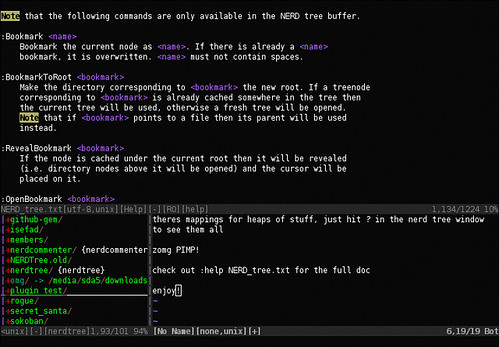
2.常用指令
Default Description~ help-tag~
Key~
o.......Open files, directories and bookmarks....................|NERDTree-o|
go......Open selected file, but leave cursor in the NERDTree.....|NERDTree-go|
t.......Open selected node/bookmark in a new tab.................|NERDTree-t|
T.......Same as 't' but keep the focus on the current tab........|NERDTree-T|
i.......Open selected file in a split window.....................|NERDTree-i|
gi......Same as i, but leave the cursor on the NERDTree..........|NERDTree-gi|
s.......Open selected file in a new vsplit.......................|NERDTree-s|
gs......Same as s, but leave the cursor on the NERDTree..........|NERDTree-gs|
O.......Recursively open the selected directory..................|NERDTree-O|
x.......Close the current nodes parent...........................|NERDTree-x|
X.......Recursively close all children of the current node.......|NERDTree-X|
e.......Edit the current dif.....................................|NERDTree-e|
double-click.......same as the |NERDTree-o| map.
middle-click.......same as |NERDTree-i| for files, same as
|NERDTree-e| for dirs.
D.......Delete the current bookmark .............................|NERDTree-D|
P.......Jump to the root node....................................|NERDTree-P|
p.......Jump to current nodes parent.............................|NERDTree-p|
K.......Jump up inside directories at the current tree depth.....|NERDTree-K|
J.......Jump down inside directories at the current tree depth...|NERDTree-J|
C.......Change the tree root to the selected dir.................|NERDTree-C|
u.......Move the tree root up one directory......................|NERDTree-u|
U.......Same as 'u' except the old root node is left open........|NERDTree-U|
r.......Recursively refresh the current directory................|NERDTree-r|
R.......Recursively refresh the current root.....................|NERDTree-R|
m.......Display the NERD tree menu...............................|NERDTree-m|
cd......Change the CWD to the dir of the selected node...........|NERDTree-cd|
I.......Toggle whether hidden files displayed....................|NERDTree-I|
f.......Toggle whether the file filters are used.................|NERDTree-f|
F.......Toggle whether files are displayed.......................|NERDTree-F|
B.......Toggle whether the bookmark table is displayed...........|NERDTree-B|
q.......Close the NERDTree window................................|NERDTree-q|
A.......Zoom (maximize/minimize) the NERDTree window.............|NERDTree-A|
?.......Toggle the display of the quick help.....................|NERDTree-?|
3.注意
Q.我在使用時,遇到一個問題 . 在vim分割視窗 + nerd_tree下.如何將其檔案開在
我想要的地方.
A.結果.是我搞錯了.正確是,以moving cursor後,再以gs,gi來
Q.增加目錄,檔案
A.When in the NERDTree window, press 'm'; you should see a menu at the bottom. Type in 'a' for add childnode. Now input the directory you want to create, making sure to add a '/' at the end, otherwise the script would create a file
Q.改變工作目錄
in NERDTree window,press 'cd'
ps:http://rickey-nctu.blogspot.com/2009/02/vim-nerd-tree.html

沒有留言:
張貼留言