2013年10月25日 星期五

vim 搜尋字串取代成具有空白字元的字串


請問大家
如何將各Arithmetic operators 算術運算子及邏輯運算子
的前後加上空格.
像是
a=b;
應為
a = b;
而對於邏輯運算子也應該用上.
不知大家都是如何去處理的?

目前都是寫完後再用搜尋取代方式(:%s/=/ = /gc)
但這樣做跟一行一行檢查一樣,而且不方便.

我想這部份可能需要用Regexp 常規表示式.
對於這個Regexp如何表示?
(+,-,*,/,+=,-=,/=,*= and ==,!=,<,>,...)
並避開一些command用的(//,/****,*/)

---------------------------------------------------------

因為,突然工作上被要求這樣..

雖然在原本的vim上,我也會有vim內建的"auto format", select all , press “=”

但是卻不能夠,滿足上述的要求,所以上網查詢了相關的"issue"。

很快地就得到了" Artistic" tool.


像是 opeator –pad

image

在使用原本的auto format

image

而使用" Artistic" tool.

image

如此,

1.各 opeator 和 operand 之間, 都會加上一個space pad

2.設定各indent 4 space

3.單行的判斷式,會自己加上一個brack


A.

download Artistic

http://sourceforge.net/projects/astyle/


B.steup (on windows to vim)

   1.to compress the

image

  2. select the bin document

image

  3.copy the astyle.exe to vim director

    同使用diff.exe .方式

  4.

    在vimrc中加入

map ,fc  <Esc>:%!astyle --style=ansi --pad-oper --min-conditional-indent=0 --max-code-length=120 --add-brackets --break-blocks --delete-empty-lines --indent=spaces=4<CR>

  5.當然,你也可以直接使用下command 去執行astyle (也可寫成batch file)

     同astyle --style=ansi --pad-oper --min-conditional-indent=0 --max-code-length=120 --add-brackets --break-blocks --delete-empty-lines --indent=spaces=4 <input file name>


Reference :

Artistic :

http://astyle.sourceforge.net/astyle.html#_pad-oper

Automatically formatting (adding spaces:

http://vim.1045645.n5.nabble.com/Automatically-formatting-adding-spaces-td1190147.html

工具使用] 代码排版 astyle

http://godbms.blogspot.tw/2012/02/astyle.html

代码排版工具——astyle

http://www.shui6.com/viewthread.php?tid=353

Auto format c file in vim

http://stackoverflow.com/questions/2355834/auto-format-c-file-in-vim

2013年10月13日 星期日

ssh sever & sftp

1.安裝

2.設定

3.使用方式

4.問題


一、安裝

不論是ssh server 或是sftp

都包在openssh-server package中,所以只需安裝openssh-server即可。

sduo apt-get install openssh-server

image


二、設定


其相關的設定在 /etc/ssh/sshd_config


    A.ssh


       只需去確定其port number即可。


       也可以去設定其只有那些IP可連進等。


   B. sftp(這裡我是先加入一個user and group for sftp,然後再將原本的加入此group來使用)


       若不新增for sftp user and group 則需將 其sshd_config中修改(去sftpusers-->use_group)


i:


/etc/ssh/sshd_config and add/edit the following lines:
 
#Subsystem sftp /usr/lib/openssh/sftp-server
Subsystem sftp internal-sftp -f AUTH -1 VERBOSE
 
#Uncomment this line if already commented
UsePAM yes
 
AllowGroups sftpusers sftp
 
Match Group sftpusers
ChrootDirectory %h
AllowTCPForwarding no
X11Forwarding no
ForceCommand internal-sftp

ii:


create the relevant users & groups


sudo groupadd sftpusers


create a user suppose sftpuser


sudo adduser sftpuser
sudo usermod -a -G sftpusers sftpuser
sudo passwd sftpuser


iii:


sudo chown root:sftpuser /home/sftpuser
sudo chmod 750 /home/sftpuser


iv: to check the sftp


sftp -vvv sftpuser@localhost

v: to add exit_user to group and open the sftp 權限:


sudo usermod -a -G sftpusers steven
egrep -i "^sftp" /etc/group
sudo ls -l /home
sudo chmod u=rwx,g=rwx /home/sftpuser
 

image


image


image


image


三、使用


ssh service:


   ssh username@serviceaddress


   若無法成功時,可加上-vvv


   ssh –vvv username@serviceaddress


image


image


sftp service:


image


image


問題:


在使用時,有遇到下列的問題(未解決,因不知原由):


1.ICEau


2.ssh connect refuse


3.ssh connect termiaal


主要是因為我是先設ssh再sftp 並重開機。


它的某一個會導致 ssh server的路徑出錯.


/var/log/auth.log

May  9 14:45:48 nj sshd[5074]: pam_unix(sshd:session): session opened for user bob by (uid=0)
May 9 14:45:48 nj sshd[5091]: fatal: bad ownership or modes for chroot directory component "/home/bob/"
May 9 14:45:48 nj sshd[5074]: pam_unix(sshd:session): session closed for user bob


ChrootDirectory /路徑
 
         AllowTcpForwarding no
 
         X11Forwarding no
 
         ForceCommand internal-sftp

必須改為:


Match Group(user) 帳號


         ChrootDirectory /路徑

         AllowTcpForwarding no

         X11Forwarding no

         ForceCommand internal-sftp

其中,其ChrootDirectory 必為root的權限.

所以你應該設為/home


參考:


 http://linux.vbird.org/linux_basic/0210filepermission.php#filepermission_ch


http://www.ubuntulinuxhelp.com/how-to-ssh-on-ubuntu-a-simple-guide/


http://askubuntu.com/questions/192401/where-is-the-default-tmux-conf-file-located


http://askubuntu.com/questions/81293/what-is-the-command-to-update-time-and-date-from-internet


http://www.pool.ntp.org/zone/asia


http://www.cyberciti.biz/faq/create-ssh-config-file-on-linux-unix/


http://winscp.net/eng/download.php


http://www.serverubuntu.it/SFTP-chroot


http://blog.srmklive.com/2013/04/24/how-to-setup-sftp-server-ftp-over-ssh-in-ubuntu/


http://chunann.wikidot.com/chown


http://nixcraft.com/ubuntu-debian/8555-ubuntu-linux-add-user-group.html


http://bruce-wang.blogspot.tw/2009/01/vim.html


http://blog.linweiyan.com/2011/08/vim.html


http://www.ewdna.com/2012/06/ubuntu-ssh-server.html


http://blog.yam.com/sawalammx/article/5845114


http://www.cyberciti.biz/faq/linux-check-existing-groups-users/


http://ubuntuforums.org/showthread.php?t=2071536


http://stackoverflow.com/questions/17335728/connect-to-host-localhost-port-22-connection-refused


http://www.ascc.sinica.edu.tw/winscp

2013年10月5日 星期六

虛擬終端機(terminal)-rxvt

image

在我的like-unix上,又加上一個terminal了(rxvt)

看起來還不錯的。(cygwin terminal(DOS) 、rxvt and ssh client)


在找cygwin看看有什麼有趣的東西時,看到rxvt

它是用來代替本來cygwin -DOS 端端機。

它同樣原本在linux上的東西。


而在cygwin上,比起DOS中,多了

1.更多的設定

2.原生的linux

3.可以複制到windows


reference:

cygwin:

http://zh.wikipedia.org/zh-tw/Cygwin

x-windows

http://zh.wikipedia.org/wiki/X_Window_System

虛擬終端

http://zh.wikipedia.org/wiki/%E8%99%9A%E6%8B%9F%E7%BB%88%E7%AB%AF

2013年9月28日 星期六

cygwin 設定顯示/輸入中文


其修正方式有下列二種,若第一種不行;可以試第二個(我的就只有第二種可以")


image


~/.bashrc

stty cs8 -istrip
stty pass8
export LANG=C
export LC_CTYPE=zh_TW.utf8
export LC_NUMERIC=zh_TW
export LC_TIME=zh_TW
export LC_COLLATE=zh_TW.utf8
export LC_ALL=zh_TW.utf8
 
alias ls="ls --show-control-chars"

其中最後 alisas ls設定,


是將特定的command 重設,為了顯示中文/或是因為傳輸格式


如: alias mosh="mosh --server='mosh-server new -l LANG=zh_TW.utf8'"


~/.inputrc


set meta-flag on
set input-meta on
set convert-meta off
set output-meta on 


最後,並且在cygwin.bat中


@echo off
 
C:
chdir C:\cygwin\bin
SET LANG=_TW.utf8 
SET LC_ALL=zh_TW.utf8
bash --login -i


二:在cgywin中 視窗中設中


image


ref:


http://irw.ncut.edu.tw/peterju/cygwin.html


http://wp.littlecho.tw/use-the-mosh-client-in-cygwin.html


http://www.crifan.com/cygwin_outpu_messy_code/

移值my gvim to cywin(一)


先介紹一下,我目前的vim 的內容


image

1.缓冲文件查看器-bufexplorer

image 

  '\be' (normal open)  or
  '\bs' (force horizontal split open)  or
  '\bv' (force vertical split open)

可以在buferxplore中, 使用t來把檔案另外開在新的tab中(關閉時,只需要C-w q或 :tabc; 切換g-t(T))


2.calendar

image

vimrc


let g:calendar_diary="C:\\Users\\steven\\steven_workdialy" "
let g:calendar_focus_today = 1
let g:calendar_mark = 'left-fit' \


command:


:cal


3.NERD_commenter


The NERD Commenter : A plugin that allows for easy commenting of code for many filetypes.


image


command :


,cc


,cm


,cu


4.NERD_tree


The NERD tree allows you to explore your filesystem and to open files and
directories.

image

http://www.flickr.com/photos/30496122@N07/2862367534/sizes/o/

vimrc:


" nerd tree//open NERDTree by  “\””e”
nmap    <leader>e    :NERDTreeToggle<CR>


command:


File node mappings~
" double-click,
" o: open in prev window
" go: preview
" t: open in new tab
" T: open in new tab silently
" middle-click,
" <tab>: open split
" g<tab>: preview split
" !: Execute file


5.Sketch

Sketch.vim -- Line drawing/painting using the mouse.

vimrc:


:map <F1> :call ToggleSketch()<CR>


command:


鼠标左键用于画自由曲线, Ctrl-鼠标左键可以画粗曲线. 鼠标右键圈一个区域, 然后点击
左键可以画空心图, Shift-鼠标左键画的的时候拐弯处用"."而不是"+", Ctrl-鼠标左键可
以画实习图. Alt-鼠标左键可以切换实心画和粗笔画的线条, 可以有的选择为".", ":"和
"#".


image


6.supertab


image


command:


它補齊的所使用的關鍵字是藉由搜尋所有被開啟的檔案內的字。而使用方式也很容易,當你打字打到一半需要它幫你補齊時就按下<tab>鍵,它就幫你把剩下的字補齊。但有時我們會希望是插入一個真正的Tab而不是要幫助補齊,這時需要按下Shift+Tab


7.taglist

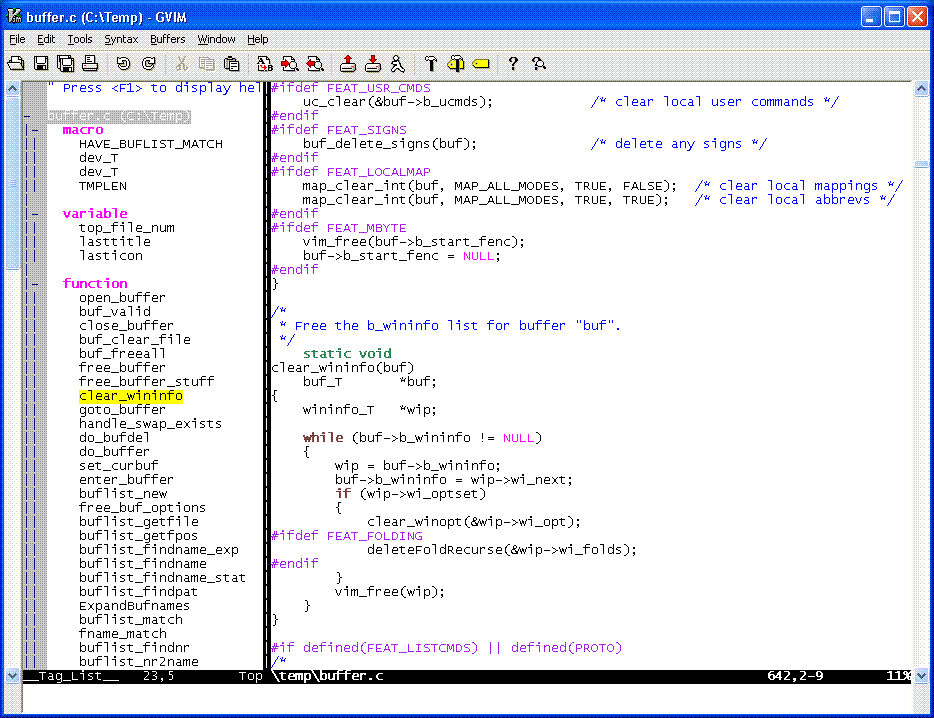
對於程式員而言是個不個貨缺的plugin。它提供了檔案內的結構、define及函式列表,並能讓使用者快速跳到這些變數的定義處。安裝TagList的過程中,除了將TagList抓下來,放到$VIM資料匣內,另外使用者必需提供一支外部程式ctags


http://vim-taglist.sourceforge.net/images/taglist_c.gif


vimrc


" ctags
let Tlist_Ctags_Cmd = $VIM . '/ctags/ctags.exe'
nmap    <leader>t    :TlistToggle<CR>


8.tetris

image

command:


:”\”te


gvim:


" Author:    Cornelius <cornelius.howl{在}gmail{點}com>
" WebSite:    http://c9s.blogspot.com
" Date:       Wed 28 Mar 2007 04:37:26 AM CST
"============================
 
 
" Colorscheme
"---------------------------------------------------
colors zenburn
"set guifont=Monaco:h10
set guifont=Bitstream\ Vera\ Sans\ Mono:h10
language mes en
"lang en
set langmenu=en_US.UTF-8
winsize 120 35
winpos 10 20


syntax on
set nocp        "no compatible
set number
set ai
set si
set incsearch
set    showcmd 
set    shiftwidth=4
set    tabstop=4
set    noeb novb ruler
set    ignorecase
set    backspace=indent,eol,start
set    history=60
set wildmenu
 
let g:calendar_diary="C:\\Users\\steven\\steven_workdialy" "
let g:calendar_focus_today = 1 
let g:calendar_mark = 'left-fit' 
 
" encoding
set        fileencodings=utf-8,big5,gbk,euc-jp,utf-bom,iso8859-1
set        encoding=utf-8
set        termencoding=utf-8
set        fileencoding=utf-8


filetype on
filetype plugin on
 
 
imap    <F2>    <C-R>=strftime("%c")<CR>
:map <F1> :call ToggleSketch()<CR>
 
 
nmap    ,te :tabedit<SPACE>
nmap    ,tx    :tabedit .<CR>
nmap    ,th    :tab help<CR>
nmap    ,tn    :tabnew<CR>
 
 
" ctags
let Tlist_Ctags_Cmd = $VIM . '/ctags/ctags.exe'
nmap    <;leader>t    :TlistToggle<CR>
 
" snippet
set runtimepath+=$VIM\snippets\after
set runtimepath+=$VIM\snippets
let g:snip_start_tag = "«"
let g:snip_end_tag = "»"
 
" vcscommand
set runtimepath+=$VIM\vcscommand
 
" nerd tree
nmap    <leader>e    :NERDTreeToggle<CR>
 
" paste
set pastetoggle=<;leader>p
 
 " 与windows共享剪贴板
set clipboard+=unnamed
 " 不要备份文件(根据自己需要取舍)
set nobackup
" 不要生成swap文件,当buffer被丢弃的时候隐藏它
setlocal noswapfile
set bufhidden=hide
 " 在状态行上显示光标所在位置的行号和列号
set ruler
set rulerformat=%20(%2*%<;%f%=\ %m%r\ %3l\ %c\ %p%%%)
 """""""""""""""""""""""""""""""""""""""""""""""""""""""""""""""""""""
" 搜索和匹配
"""""""""""""""""""""""""""""""""""""""""""""""""""""""""""""""""""""
" 高亮显示匹配的括号
set showmatch
" 匹配括号高亮的时间(单位是十分之一秒)
set matchtime=1
" 在搜索的时候忽略大小写
set ignorecase
 " 用空格键来开关折叠
  set foldenable
  set foldmethod=manual
  nnoremap <space> @=((foldclosed(line('.')) < 0) ? 'zc' : 'zo')<CR>
 """""""""""""""""""""""""""""""""""""""""""""""""""""""""""""""""""""
" Autocommands
"""""""""""""""""""""""""""""""""""""""""""""""""""""""""""""""""""""
" 只在下列文件类型被侦测到的时候显示行号,普通文本文件不显示
 
  if has("autocmd")
    autocmd FileType xml,html,css,js,c,cs,java,perl,shell,bash,cpp,python,vim,php,ruby,markdown,sh,md set number
    autocmd FileType xml,html vmap <C-o> <ESC>'<i<!--<ESC>o<ESC>'>o-->
    autocmd FileType java,c,cpp,cs vmap <C-o> <ESC>'<o
    autocmd FileType html,text,php,vim,c,java,xml,bash,shell,perl,python setlocal textwidth=100
autocmd FileType html,htmldjango,jinjahtml,eruby,mako let b:closetag_html_style=1
autocmd FileType html,xhtml,xml,htmldjango,jinjahtml,eruby,mako source ~/.vim/bundle/closetag.vim/plugin/closetag.vim
    autocmd BufReadPost *
      \ if line("'\"") >; 0 && line("'\"") <= line("$") |
      \ exe " normal g`\"" |
      \ endif
  endif "has("autocmd")
 
" F5编译和运行C程序,F6编译和运行C++程序
" 请注意,下述代码在windows下使用会报错
" 需要去掉./这两个字符
" C的编译和运行
  map <;F5> :call CompileRunGcc()<CR>
  func! CompileRunGcc()
  exec "w"
  exec "!gcc % -g -o %<"
" exec "! %<;"
  endfunc
  map <;F6> :call RunGcc()<CR>
  func! RunGcc()
  exec "w"
  exec "! %<"
  endfunc
  map <;F7> :call RunGdb()<CR>
  func! RunGdb()
  exec "w"
  exec "!gdb %<"
  endfunc
" C++的编译和运行
  map <F9> :call CompileRunGpp()<CR>
  func! CompileRunGpp()
  exec "w"
  exec "!g++ % -o %<;"
  exec "! %<"
  endfunc
 
let g:SuperTabDefaultCompletionType = "context"
let g:snips_trigger_key='<;F3>' 
:imap jj <;Esc>


cygwin vim:(未完成,??)....ctage,comm…


imap <;F2> <C-R>=strftime("%c")<CR>
nmap ,te :tabedit<;SPACE>
nmap ,tx :tabedit .<;CR>
nmap ,th :tab help<;CR>
nmap ,tn :tabnew<;CR>
"nerd tree
nmap <leader>e :NERDTreeToggle<CR>
"paste
set pastetoggle=<;leader>p
set showmatch
set ff=unix
set nobackup
setlocal noswapfile
set bufhidden=hide
set matchtime=1
set ignorecase
"set backspace to fold
set foldenable
set foldmethod=manual
nnoremap <SPACE> @=((foldclosed(line('.'))<0)?'zc':'zo')<CR>
:imap jj <Esc>
"ctags
let Tlist_Ctags_Cmd = "/usr/bin/ctags.exe"
let Tlist_Show_One_File=1
nmap <;leader>t :TlistToggle<CR>
~

reference:

bufexplorer

http://www.vim.org/scripts/script.php?script_id=42

calendar


http://www.vim.org/scripts/script.php?script_id=52


calendar


http://www.vim.org/scripts/script.php?script_id=1218


NERDComComment


http://www.vim.org/scripts/script.php?script_id=1218


NERD_tree


http://www.vim.org/scripts/script.php?script_id=1658


Sketch


http://guoyoooping.blog.163.com/blog/static/135705183201003172658693/


http://www.vim.org/scripts/script.php?script_id=705


supertab


http://rickey-nctu.blogspot.tw/2009/03/vim-supertab-omnicppcomplete.html


taglist


http://www.vim.org/scripts/script.php?script_id=273


http://vim-taglist.sourceforge.net/index.html


http://rickey-nctu.blogspot.tw/2009/02/vim-taglist.html


tetris


http://www.vim.org/scripts/script.php?script_id=172